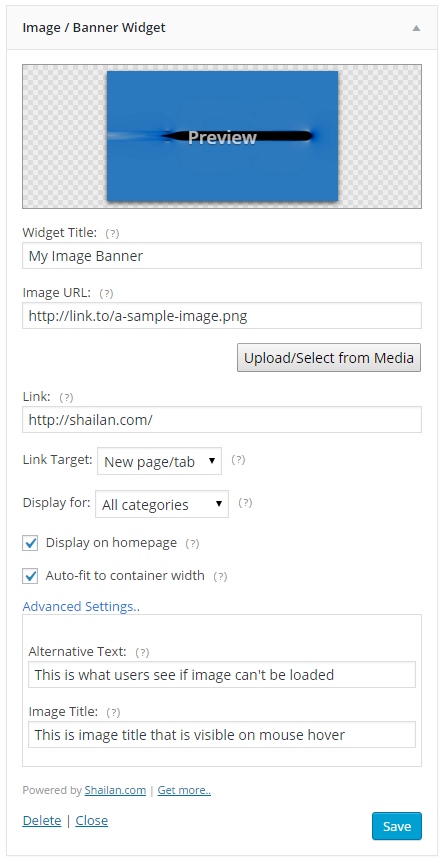
Image Banner Widget is a plugin for WordPress to display images or banners on your sidebar easily. If you don’t have the plugin you can download it from WordPress plugins directory.
Features
- Image upload/select button Easily upload to or select image from your media library
- Link target You can set links to open in a new tab
- Display options Widget visibility can be limited to a category or a page
- Auto-fit Images automatically resize to fit width of the sidebar
Installation
- Visit
Plugins > Add Newlink on your admin panel. - Search for
image banner widget - Click on
Installbutton on plugin listing. - After installation is complete click
Activatelink. - Go to
Appearance > Widgetspage on your admin panel. - Add Image Banner Widget to your sidebar and add your image. Done.
See documentation page for more information.

Add Images and Banners to your sidebars easily! Add title, link, alternative text, even set the link targets with one widget. No coding required!
Description
Add Images and Banners to your sidebars easily!
Add images and image banners in your sidebars in just 3 steps:
- Just drag 'n drop the widget to your sidebar,
- Enter the image url and the link,
- Save & Close.
- It will fit to the container it is located in.
If you like this plugin, you might consider a donation.
Installation
You can search for image-banner-widget on your plugin search to install this plugin.
- Download the widget and upload it to your server through
WP Admin > Plugins > Add New > Upload - After the upload is complete activate the plugin.
- Go to Appearance > Widgets page, drag and drop the widget to your sidebar.
- Fill in the blanks as needed, and done!
Download
You can download latest version of the plugin on WordPress Plugins.
You can download development version from Github.